Teams
Pick the course & layout, check players in, and generate random doubles. Drag teams between cards to even things out.
Doubles Night handles the boring parts of league night — random teams, shotgun starts, CTP flags, payouts, and league points — so you can just throw.
The flow
The bottom of the app is split into four phases. You move left to right across the evening — and you can jump back any time.
Pick the course & layout, check players in, and generate random doubles. Drag teams between cards to even things out.
Assign each card a starting hole for the shotgun, then mark your CTP holes. The flag plan builds itself.
Type in team scores, pick CTP winners, and tabulate placings, payouts, and league points instantly.
A clean, printable sheet with cards, starting holes, results, and payouts — ready for the board or the group chat.
Step by step
Set the club up once, then follow these in order each week. The whole thing takes a couple of minutes before anyone tees off.
Open Settings and enter your club name, the buy-in per player, and the dollar amount second place pays each player. Doubles Night remembers it for every future night.
Do this the first time onlyUse the built-in Standard 18 / Standard 9, add a course by hand, or — including per-hole pars and distances — so starting holes and the flag plan line up with reality.
Reused every week once addedStart typing a name and pick from players you've had before, or add someone new. Everyone you check in is remembered, so check-in gets faster every week.
Names autocomplete from past nightsTap Generate Teams for a fresh random draw of doubles, grouped into cards. Don't love a pairing? Re-generate, or drag a team onto another card. An odd player out becomes a Schizo (see below).
Re-roll as many times as you likeOn the Holes tab, drag each card onto its hole — or use the Starting Hole Draw to pick the spots in play and let the app randomly deal them out for a fair shotgun start.
Drag cards or draw at randomSwitch to Mark CTP and tap the holes running closest-to-the-pin. Flag each one as a Cash or Disc prize, and the CTP Flag Plan tells you exactly which card carries the flag out and which brings it back.
Take-out / bring-back is automaticOn Results, type each team's score relative to par and choose the CTP winners. Tap Tabulate and Doubles Night ranks the field, splits the pot, and works out league points — aces included.
Placings, payouts & points at onceOpen Print Out for a clean sheet with the cards, starting holes, final standings, and payouts — ready to print for the board or copy into the group chat.
One tap to a shareable sheetKey ideas
A few things Doubles Night does for you behind the scenes — here's what they mean.
Dial in your league's own rules: set the buy-in and second-place payout, tweak how league points are scored, and add your home courses — type a layout in by hand or copy it straight from UDisc. Your settings stick for every future night.
Every player earns points off the field average — beating the average is worth more, the night's winners get a bonus, and each ace adds a chunk on top. Great for running a season-long standings.
The pot is players × buy-in. A solo second place is paid your set per-player rate; first place takes whatever's left. First-place ties split the remainder evenly — no mental math at the picnic table.
Odd number of players? The leftover plays solo as a "Schizo," gets paired onto the lightest card, and still counts toward the pot. If they bought in twice, flip the switch on Results to count them as an extra share.
From everyone's starting holes, the app figures out which card reaches each CTP hole first (takes the flag out) and which reaches it last (brings it back) — so the flag is always where it needs to be.
There's no account and no server. Your club settings, players, and nights live on your device, so the app keeps working even when the course has no signal.
Pro tips
From your phone browser, "Add to Home Screen" so Doubles Night opens full-screen like a native app every week.
Pasting the UDisc layout pulls in per-hole pars and distances, which makes the shotgun draw and CTP flag plan match the course exactly.
The draw is one tap, so generate a few times — or drag teams between cards — until the matchups look fair before you lock in holes.
Because everything saves locally, running the night from one phone keeps your player list and history all in one place.
Open Doubles Night, check your crew in, and let it handle the teams, flags, money, and points.
disc.spiris.app · No download required
Open the course's Layouts on UDisc, then select the whole layout block — name plus the Holes / Dist / Par rows — and copy it.
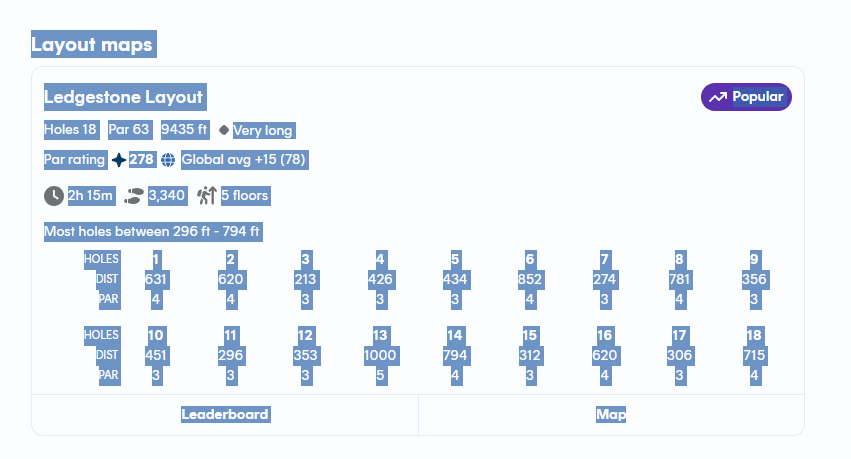
Highlight everything shown here (the layout name and the full Holes / Dist / Par tables), copy it, then paste it into Doubles Night's Import Layout box — it reads the holes, distances, and pars automatically.
Share an idea, request a feature, or report something that made league night harder.